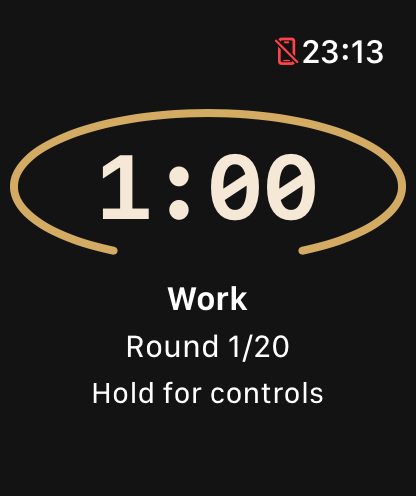
Start your recent session with one tap, choose a ready session or build your own. Large numbers and distinct work and rest cues keep the clock readable during the set.
In version 2.9.0, tap the stop control, then confirm to end a running or paused timer. Store links open the available version. Intelligent Timer appears on phones with an available on-device AI model: the first analysis is free, further analyses require Pro. Saved programmes remain playable after Pro ends; your text stays on the phone.
EMOM10 × 1 min
Read it in mid-set
A new round starts at each interval, for example every minute.
Large numbers, a full progress circle for work and rest distinguish each phase. Sounds and haptics mark changes.
Use AirPlay or a connected display on iPhone, or an external display on Android. The phone keeps control; no dedicated Cast receiver is required.
TEMPO3-0-2-0
Every rep gets a rhythm.
Sets and reps with a fixed duration for each phase: lowering, pause, lifting, pause. Start with the lowering or the lifting phase.
Launch your recent timer directly, save your own configurations or choose one of 21 ready sessions.
APPLE WATCH · WEAR OS
The timer on your wrist.
Apple Watch and Wear OS run all nine modes independently. Sessions and Pro access synchronize with the paired phone.
Nine timer modes, all free
TEMPOSets and reps with a fixed duration for each phase: lowering, pause, lifting, pause. Start with the lowering or the lifting phase.
EMOMA new round starts at each interval, for example every minute.
TABATAWork and rest intervals repeated over several rounds, such as 20 seconds on and 10 off, eight times.
AMRAPAs many rounds as you can before the time runs out.
FOR TIMEA stopwatch for finishing a workout as fast as you can, with an optional time cap.
MIXSeveral modes chained in one session, in the order you set.
RESTA countdown for the rest between sets.
STOPWATCHA simple stopwatch.
MIRRORYour rest equals your work time multiplied by the ratio you choose.
What Pro adds
All nine modes, Apple Watch, Wear OS, Live Activities and sound and haptic alerts are free, with no session limit.
Free
2 saved configurations
MIX circuits with up to 2 blocks
The last 7 days of workout history
TempoReps Pro
Up to 20 saved configurations
MIX circuits with unlimited blocks
Full history, statistics and training streaks, with one rest day allowed
Reminders for a saved timer
Optional saving of workouts to Apple Health
Room display after one complete free session
On the US App Store, Pro costs $2.99 a month, $12.99 a year or $29.99 once for Lifetime. In other countries, the app shows the price before you buy.
Subscriptions renew automatically unless you cancel at least 24 hours before the end of the period. You manage them in your Apple Account settings. If you already bought Pro, you keep it.
No app account or ads. Android SDK diagnostics are described in the privacy policy. Workouts and settings stay in your device backup and device transfer, according to your system settings. You can export or import a JSON backup from Settings. Restore purchases through the store. Privacy policy